.png?width=256&height=60&name=Logo%20(1).png)
The Certificates of Completion feature provides workers and contractors with clear, auditable proof that they have completed the correct safety training for their assigned group.
Certificates are dynamic — always showing the most up-to-date training status — and can be used for site access verification.
Admin experience
Enable automated certificate issuance
In the Training Configuration for a group, toggle Enable certificates.

💡 Find a guide on creating a Training Configuration here.
Once enabled:
- Certificates are generated and sent by email automatically for users who complete all required modules.
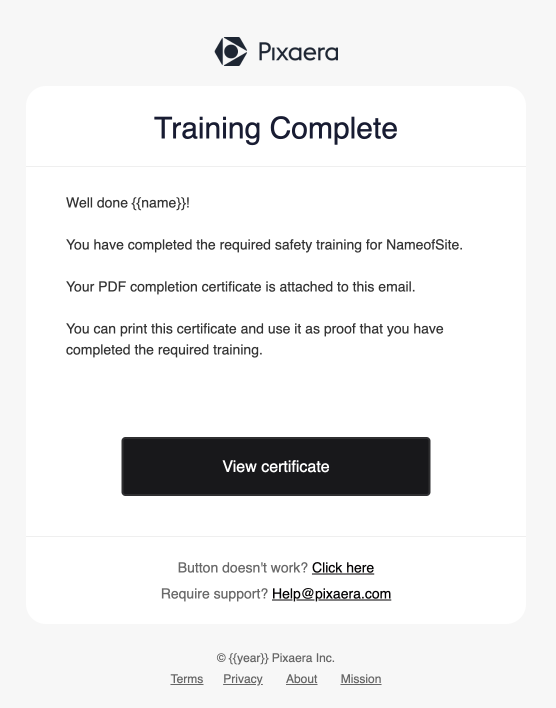
- The certificate’s status updates in real time based on:
- Completed modules
- Incomplete or expired modules
- Any newly assigned training

Dynamic certificate behavior
- VALID – All required training is complete and within validity period
- INVALID – One or more required modules are incomplete, expired, or newly assigned after issuance
- Certificates automatically revalidate once missing training is completed.
Manual individual certificates
In addition to automated issuance, Admins can generate one-off PDF certificates for individual workers.
Admin experience:
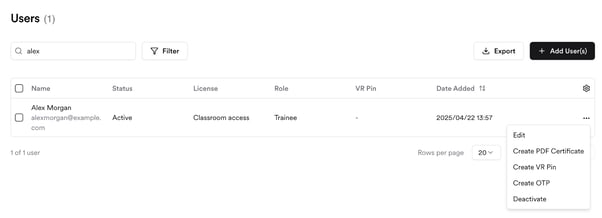
- From the Organization tab, go to Users.
- Select a user and generate their PDF Certificate.
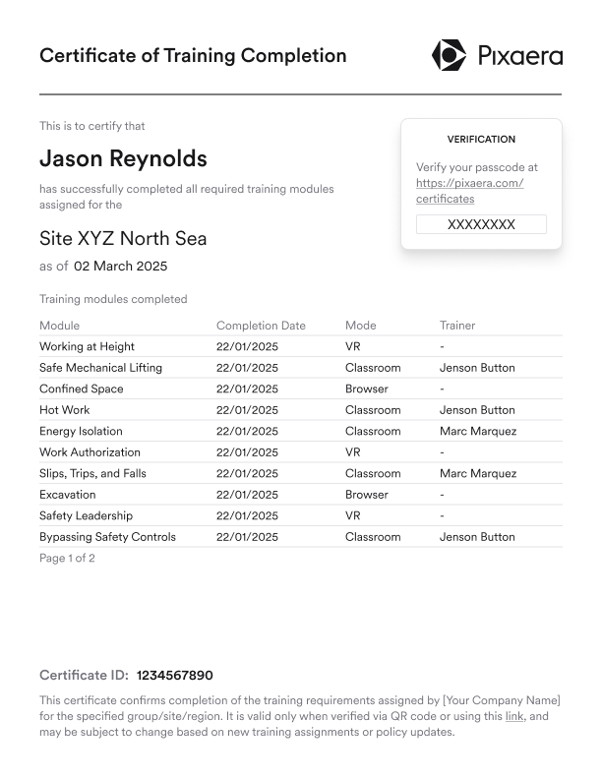
- The user’s training history
- All completed modules with completion dates
Here’s a PDF certificate example:
- Certificates can be:
- Downloaded by the admin
- Shared manually with site managers or compliance officers
- On-site managers can validate the certificate using the embedded passcode.

Pro tips
- Use shorter validity periods for high-risk training modules to keep workers’ knowledge current.
- Train site gatekeepers to recognize the VALID/INVALID status at a glance.
- Periodically review your training configurations to ensure certificate accuracy.
Learner experience
- Users receive their certificate by email immediately after completing all required training.
- The certificate:
- Can be shown at site entry for compliance verification
- Displays a live compliance status
- Lists completed and incomplete modules for transparency