.png?width=256&height=60&name=Logo%20(1).png)
What it is
An incident learning, sometimes called a Learning From Incident or LFI, is a short scenario built from a real event at one of your sites. Instead of reading a summary of a confined-space entry that went wrong, a worker steps through the situation, makes the calls the original team faced, and sees where the decision points were.
You'll find these in the Incidents section in your admin platform. It works the same way as your Training Library, with a few differences that matter for incidents:
- Each learning carries incident-specific details: incident type (near miss, injury, illness, property damage, environmental, fatality), severity, the date it happened, and the location.
- You can see engagement at a glance, including completions and average score, through the same reporting you already use for training.
- You deploy incident learnings to the right people using the group, site, and region assignment you already know.
How it works
Submitting an incident
When you have an incident you want turned into a learning:
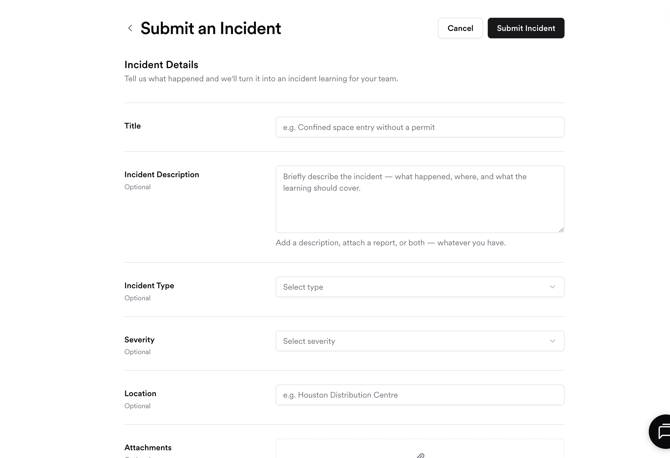
- Click Submit Incident at the top right of the Incidents page.
- Give it a Title — for example, "Confined space entry without a permit."
- Add an Incident Description if you have one. A few sentences on what happened, where, and what the learning should cover is enough. (Optional)
- Choose an Incident Type and Severity if you know them. (Optional)
- Add a Location so the learning reflects the right site. (Optional)
- Attach a report, photos, or any supporting material if you have them. PDF, Word, PowerPoint, Excel, and image files are supported. You can add a description, attach a report, or both, whatever you have to hand.
- Click Submit Incident.
You don't need a polished write-up to submit. A short description or an existing incident report gives our team enough to start from.
Browsing your incident learnings
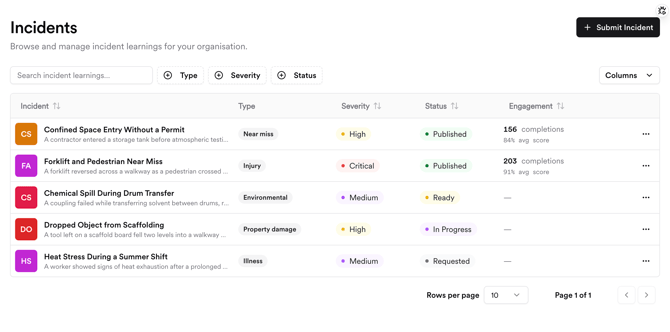
Open the Incidents tab in the left-hand menu. You'll see a list of the incident learnings available to your organisation, with columns for type, severity, status, and engagement. Use the search box and the Type, Severity, and Status filters to find a specific learning, and the Columns control to choose what's shown in the table.
A learning's status tells you where it is:
- Requested / In Progress — submitted and being built by the Pixaera team.
- Ready — built and available for you to deploy.
- Published — live and ready to be assigned to your workforce.
Deploying a learning to your teams
Once a learning is Ready, you assign it exactly as you would any training module: to the groups, sites, and regions that need it. From there it appears in each worker's Training dashboard alongside their other modules, on whatever device they use.
What happens after you submit
Submitting an incident doesn't instantly generate a learning. Each incident learning is built by our team rather than auto-generated from your text.
Here's the path:
- You submit the incident and any supporting material.
- The Pixaera team reviews it. We check the details, confirm it's a good fit for an incident learning, and make sure we have what we need.
- Our content team builds it through the same production pipeline behind every Pixaera module, so the scenario, decision points, and consequences hold up to the same standard as the rest of your training.
- It lands in your Incidents Library as Ready, and you deploy it to the right teams.
This is why you'll see a learning move through statuses like Requested and In Progress before it's Ready. Build time is within 72 hours — it depends on the incident and the scope of the learning. Your account manager can give you a timeline once a request is in.
Access and packages
Learning from Incidents is available as part of separate Pixaera packages. Whether it's included in your current plan depends on your agreement.
- If incident learnings are part of your package, you can submit incidents and deploy the resulting learnings as described above.
- If they're not yet part of your package, you'll still be able to explore the Incidents section and see how it works. To start turning your own incidents into learnings, talk to your account manager about adding it.
For pricing, what's included, and turnaround on new learnings, your account manager or the Pixaera team is the best place to start. They can walk you through how Learning from Incidents fits alongside your existing training programme.
Good to know
- Learners don't get a separate experience. Incident learnings appear in Training dashboard as a module, so there's nothing new for your frontline or contractors to learn. They open it the way they open everything else.
- You author incidents by submitting them, not by building them yourself. Self-serve authoring, where your team creates incident learnings directly, is something we're working towards. For now, you submit and our team builds.
- It runs on what you already use. Deployment, assignment, and expirable certificates all work the way they do for your existing training, so there's no new workflow to set up.