.png?width=256&height=60&name=Logo%20(1).png)
Contractors shouldn’t be an afterthought. With Pixaera, you can create dedicated groups, assign access, and track their training history just like internal staff. No more emailing spreadsheets or managing records separately — now all training data lives in one system.
Setting up contractor groups
To manage contractors effectively:
- Create a custom group specifically for external contractors.
- Add users manually or via bulk import.
💡Learn more about Groups in this guide.
Assign training modules
Assign specific training modules to contractor groups. This ensures that each contractor receives only the training relevant to their responsibilities or site-specific compliance.
- Go to the dashboard and select a contractor group (e.g., "Site A Contractors").
- Create a training configuration for this group.
- Set each module as required, optional, or hidden.
- Define validity periods (e.g., 6 or 12 months). After expiry, modules will need to be retaken to maintain compliance.
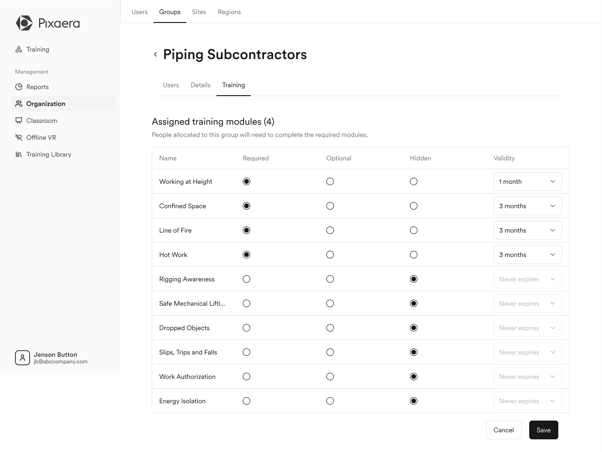
You have full control over visibility and renewal rules, making it easier to manage seasonal contractors or rotating subcontractor crews.
💡Access the full guide on Module Assignment here.
Track compliance with certificates
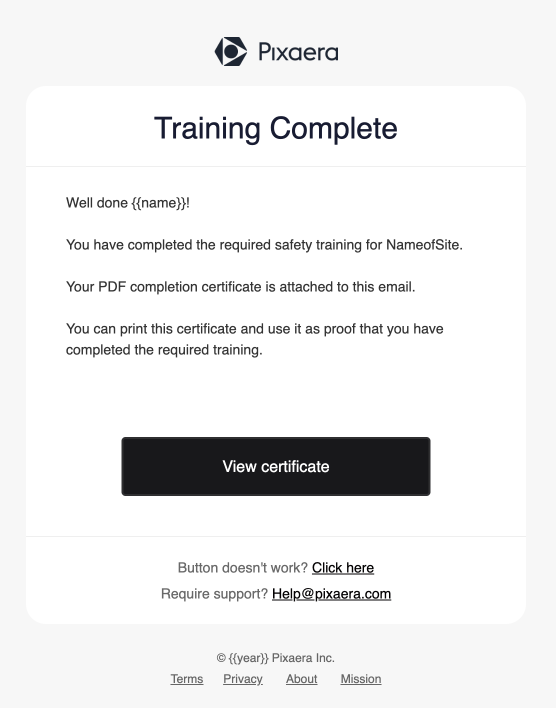
Upon completing assigned training, contractor will receive a certificate. You can use it to verify competence and gate site access.
Each certificate includes:
- A full training history with completion dates
- A unique passcode for validation onsite

Automatic issuance
You can enable automated certificate issuance for a training configuration with a single toggle.
- Navigate to the “Groups” tab under the Organization;
- Select the group and click the “Training” tab;
- Toggle the “Completion certificate” to enabled.
- Certificates will be generated automatically based on the group’s assigned training.
- The certificate is dynamic and reflects:
- Completed modules
- Incomplete modules (if any)
- A real-time VALID or INVALID status

- Certificates update automatically if training is completed, added, or expires.
- Contractors will receive certificates via email once training is complete.
Access links for seamless onboarding
Simplify access by generating self-serve training links:
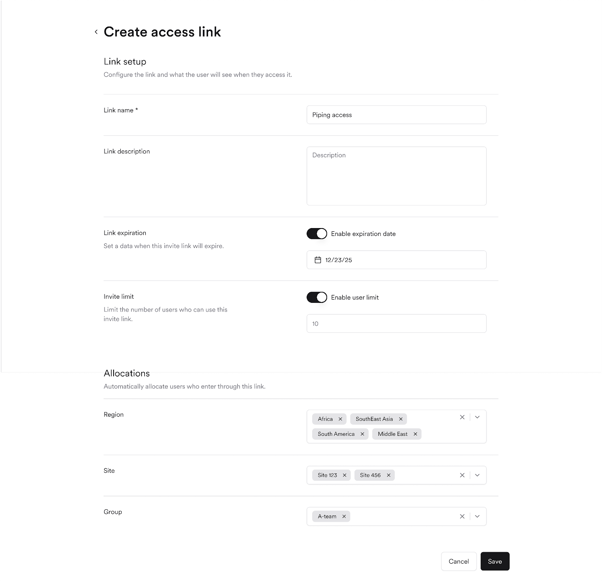
- Admins create Access Links for each contractor group.
- Contractors click the link, sign up, and are automatically placed in the correct group/site/region.
- This removes manual onboarding and ensures each user sees only the training assigned to them.
Once logged in, contractors will land on a clean, focused dashboard showing only their relevant modules.
💡 Learn more about using Access Links in this article.
Contractor onboarding and training flow
Here’s how to build a scalable and efficient contractor training experience:
- Assign training in advance
Pre-assign training modules based on a contractor’s site, region, or group-specific safety protocols — so training requirements are tailored and ready in advance. - Share self-serve access links
Create access links that automatically assign contractors to the correct group, site, or region upon sign-up. Contractors access training via a custom link shared with them. This removes manual onboarding steps and ensures users are assigned correctly from the start. - Contractors know exactly what to do
As soon as a contractor enters Pixaera, they see a clean dashboard showing only the relevant training modules assigned to them — no confusion, no clutter. - Self-serve completion
Contractors can complete training on their own schedule — before arriving on site — making onboarding asynchronous and more efficient. - Automatic certificate issuance
Once all required modules are completed, the system automatically issues a certificate (if enabled by admin). This certificate is what grants them site access. - Real-time validation & ongoing compliance
If new training is assigned later, or if a module completion expires, the certificate is marked invalid until the contractor completes the update — ensuring ongoing compliance without manual tracking.